OCR, AI Refinement, Translation & Custom Prompts
OCR · Refinement · Translation = All plansCustom = UnlimitedWhat you'll learn
- The two-layer system: OCR Result and AI Refined
- Built-in refinement and translation templates (all plans) and custom prompts (Unlimited)
- Layout detection and tokens
1OCR (Text Recognition)
OCR reads text from your captured images and converts it to editable text. It runs entirely on your PC and is available on all plans.
In the Image Processing / OCR tab, select the images you want to process (check the boxes) and run OCR. The results will appear in the Text Editing tab.
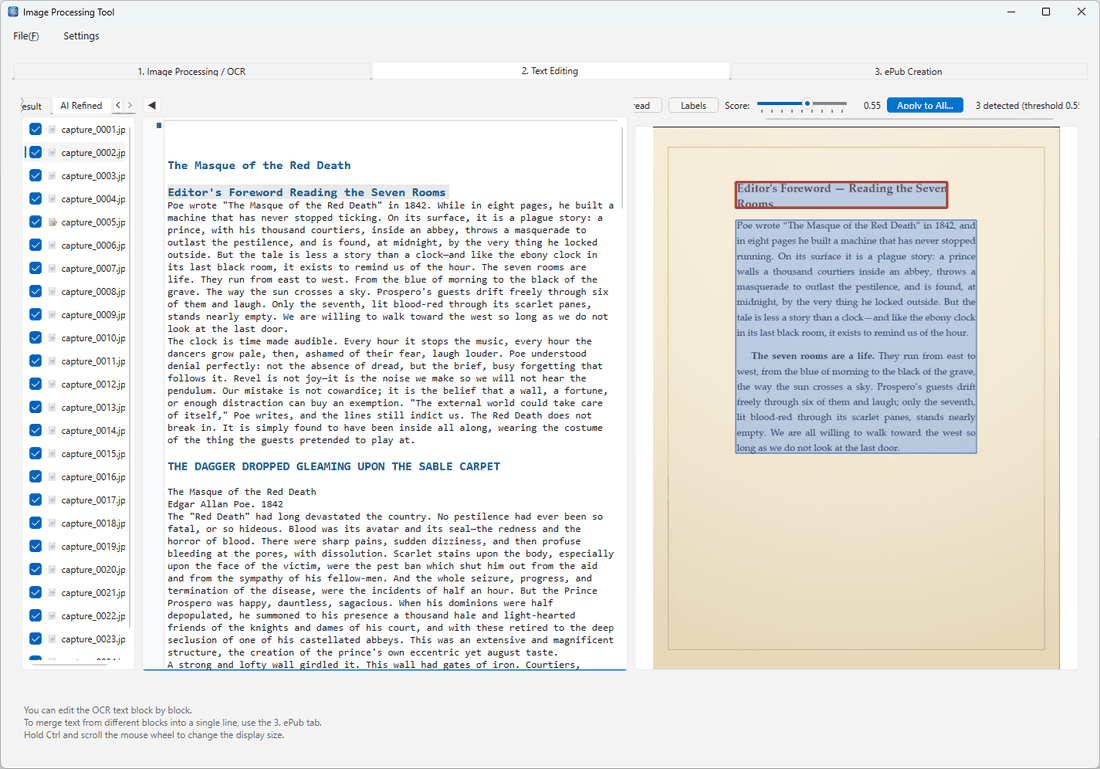
2Two Layers: OCR Result and AI Refined
The Text Editing tab has two layers that you switch between using the tabs at the top.
- OCR Result — The raw text as recognized by OCR.
- AI Refined — The text after AI has cleaned it up.
OCR output can contain broken line breaks or misread characters. You can fix these manually, or use AI refinement to clean them up automatically.
3AI Refinement & Translation (Built-in Templates) All plans
You can use AI to refine or translate the recognized text. The built-in templates listed below are available on all plans.
| Template | What it does |
|---|---|
| Refine | Fixes misrecognized characters and broken line breaks, producing clean, readable text. |
| Structured Refine | Refines the text while preserving document structure such as headings and paragraphs. |
| Translate | Translates the text into a language of your choice. |
4Custom Prompts Unlimited
On the Unlimited plan, in addition to the built-in templates you can write your own instructions (prompts) to drive AI refinement and translation — create, save, and apply them as needed. Use cases include summarization, adding explanatory notes, or applying a specific formatting style.
Tips for writing prompts
- Role and output formatting are handled automatically, so just describe the transformation you want (e.g., "Fix typos", "Convert to formal register", "Summarize in English").
- Set the output language using the "Output language:" line in the template (e.g., keep original / English).
- Some constraints are enforced: one page in = one page out, and the output is plain body text (merging pages or producing complex custom layouts is not supported).
5Layout Detection (Columns, Text Direction & Spreads)
At the top of the Image Processing / OCR tab you will find layout detection settings that improve recognition accuracy. Matching the settings to your document's layout ensures text is read in the correct order.
- Vertical / Horizontal text — The writing direction of the document.
- Columns (e.g., two-column) and reading order — Reads multi-column pages in the correct sequence.
- Spread split — When a single image shows two facing pages, splits them before processing.
Detection results can be reviewed and adjusted page by page, and settings can be applied to all images at once.
6About Tokens
AI refinement and translation consume tokens in proportion to the amount of text processed. The available amount varies by plan.
- Pro / Unlimited — A monthly token allowance is included. Check your remaining balance under Settings → License Settings.
- Starter — You can try AI refinement within a limited free quota (daily usage limit and a per-run character cap apply).