What you'll learn
- Differences between Starter, Pro, and Unlimited
- Activating your license and managing devices
- Tokens and the free trial
1Three plans
StillSnap offers three plans: Starter (free), Pro, and Unlimited. Core capture, OCR, and AI refinement are available even on the free Starter plan. Higher-tier plans unlock additional formats and features.
- Starter — A free plan to try the core features.
- Pro — Adds Window Click, browser capture (Bookmarklet), PNG/WEBP output, PDF and ePub export, and more.
- Unlimited — Everything in Pro plus Auto-trim, custom prompts, watermark customization, and all remaining features.
Your current plan is shown in the status bar at the bottom-right of the main window. Buttons labeled (Pro) or similar require that plan or higher.
2Plan comparison
| Feature | Starter | Pro | Unlimited |
|---|---|---|---|
| Drag to select area / OCR / AI Upscaling / AI refinement & translation | ✓ | ✓ | ✓ |
| Window Click / Browser capture (Bookmarklet) | — | ✓ | ✓ |
| Manual Wait Mode / Stop on URL change | — | ✓ | ✓ |
| PNG / WEBP format / PDF & ePub output / Fixed-layout ePub | — | ✓ | ✓ |
| Coordinate presets (save capture range) | 1 | 10 | Unlimited |
| Auto-resume | — | — | ✓ |
| Auto-trim / Custom prompts / Searchable PDF | — | — | ✓ |
| Add & customize watermarks / Hide ads | — | — | ✓ |
For the latest pricing and plan details, see the Download page.
3Activating your license
- Open Settings → License Settings from the menu.
- Enter the License Key from your purchase confirmation email.
- Click Activate License. Your plan name and expiry date will appear.
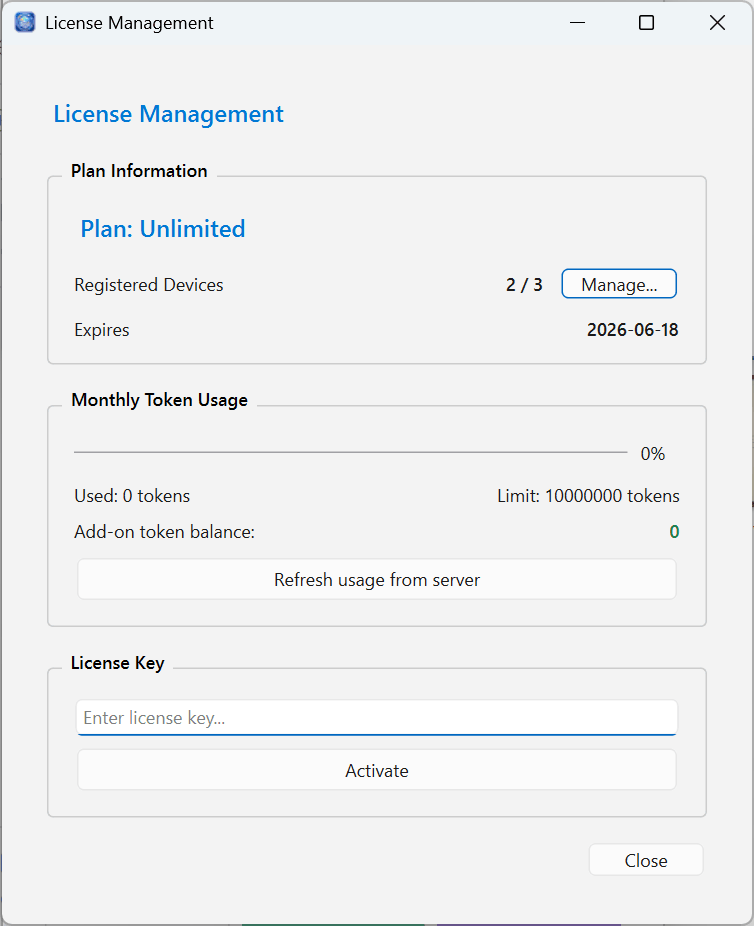
An internet connection is required for activation. If your plan or expiry date does not update, check your connection and then try Fetch latest usage from server or re-activate your license.
4Managing devices
Each license has a device registration limit (3 devices by default). The License Settings screen shows your current count as Registered: ○ / Limit: ○.
- Click Manage... to view registered devices and deregister any you no longer use.
- To activate on a new PC, deregister an unused device first to free up a slot.
If you try to activate on a new device when the limit is already reached, you will see "Device registration limit reached." Deregister an existing device before proceeding.
5Tokens (AI refinement & translation)
AI refinement and translation consume tokens proportional to the amount of text processed.
- Pro / Unlimited — Tokens are replenished monthly. Check your remaining balance under License Settings → Monthly Token Usage. Any add-on token balance is also shown there.
- Monthly reset — Tokens reset each month based on your billing date (the date your subscription started). The expiry date shown indicates your next renewal date.
- Starter — AI refinement is available within a daily trial limit (capped by number of uses per day and characters per use).
When you reach the limit, a message will appear. To continue, consider upgrading your plan or purchasing additional tokens. For details on using AI refinement and translation, see OCR, AI Refinement, Translation & Custom Prompts.